Advanced Kanban Customization – Swimlanes, Conditional Colors, and Card Fields 🎨
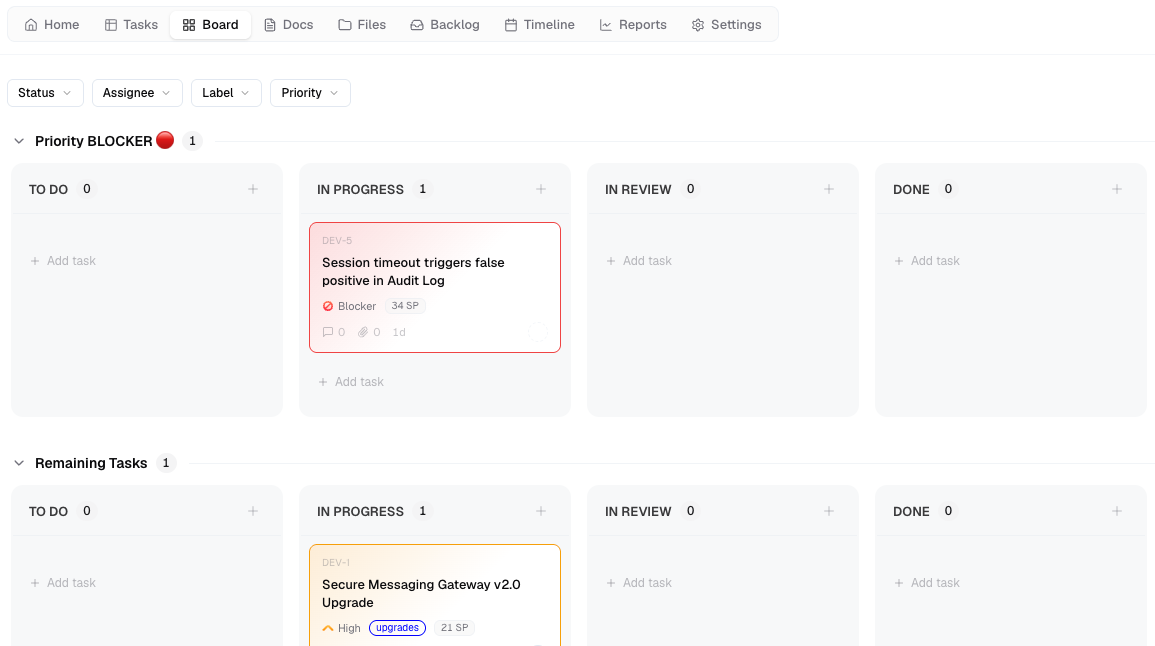
We have rolled out a couple of updates to the Kanban view in the Projects module. This release focuses on giving your team more structural control and better visual context, allowing you to organize complex boards exactly how your specific workflows require.
Here is what is new:
🎨 Conditional Card Styling
You can now apply color indicators to your Kanban cards based on custom filter rules. To keep the board structured and prevent visual overload, we added 6 distinct styling options (including top border, corner indicator, and subtle gradients). You can stack multiple filters to define exactly when a card receives a specific style—for example, to instantly highlight blocked tasks or high-priority items approaching their deadline.
🏷️ Configurable Card Fields
To reduce the need to open individual tasks for basic context, you can now surface up to three custom fields directly on the Kanban card. This allows you to expose the most critical metadata—such as specific tags, assignees, or linked Registry assets—at a glance, tailored to the current project's needs.
🛤️ Dynamic Swimlanes
You can now structure your board horizontally using custom swimlanes. These are not limited to default system properties; instead, they are generated dynamically based on your own filter configurations. You can assign custom names to each swimlane, allowing you to clearly separate workstreams (e.g., dividing the board by specific epics, teams, or maintenance vs. feature work).